Monday, December 31, 2018

Java program for fibonacci series for n elements


    package example;

import java.util.ArrayList;
import java.util.List;

public class Fibonacci {

public static void main(String[] args) {
int n =10;
int t1=0, t2=1;
int sum;

List<Integer> l = new ArrayList<>();
l.add(t1);l.add(t2);
for(int i = 1; i<(n - 1); i++)
{
  sum = t1 + t2;
  l.add(sum);
  t1 = t2;
  t2 = sum;

}
       System.out.println(l);
}

}

Output:  [0, 1, 1, 2, 3, 5, 8, 13, 21, 34]

Java program to count duplicates in a list


    package example;

import java.util.ArrayList;
import java.util.Arrays;
import java.util.Collections;
import java.util.HashMap;
import java.util.HashSet;
import java.util.List;
import java.util.Map;
import java.util.Set;

public class FruitsExample {


public static void main(String[] args) {

List<String> list = new ArrayList<String>();
        list.addAll(Arrays.asList("banana","apple","apple","mango","banana","orange"));
        Map<String, Integer> map = new HashMap<String, Integer>();
         
        Set<String> set = new HashSet<String>();
        set.addAll(list);
     
        for(String str:set)
        {
        int occ = Collections.frequency(list, str);
       
        map.put(str,occ);
        }
         
        System.out.println(map);
        map.forEach((k,n) -> System.out.println(k+"->"+n));
}
}

OUTPUT:  {banana=2, orange=1, apple=2, mango=1}
banana->2
orange->1
apple->2
mango->1

Sorting an array using single loop


            package example;

public class singleLoopSort {

public static void main(String[] args) {
int[] list = {23,90,45,78,56,45,23};
int temp;

for(int i = 0; i < list.length - 1; i++)
{
if (list[i] > list[i + 1]) {
temp = list[i];
list[i] = list[i + 1];
list[i + 1] = temp;
i = 0;
}
}

  for (int i = 0; i < list.length; i++) {
        System.out.print(list[i] + " ");
    }
 
  System.out.println("REVERSE ORDER :");
  for (int i = list.length -1 ; i >= 0; i--) {
        System.out.print(list[i] + " ");
    }  
}

}

output:
23 45 56 78 90
REVERSE ORDER : 90 78 56 45 23 

Java program using var args

package example;

public class varargs {

public static void main(String[] args) {
System.out.println("1:" + sum(1, 2, 3));
System.out.println("2:" + sum(1, 2, 3, 6, 7, 0));

}

public static int sum(int... a) {
int sum1 = 0;

for (int i : a) {
sum1 = sum1 + i;
}
return sum1;

}

}


Output: 

1:6
2:19

Java program to count number of palindrome words in a given sentence


package example;

import java.util.StringTokenizer;

public class palindromeCount {

public static void main(String[] args) {
String str = " Madam Arora non teaches io malayalam ";
StringTokenizer st = new StringTokenizer(str, " ");
int palinCount = 0;

while (st.hasMoreElements()) {
if (checkPalindrome(st.nextToken())) {
palinCount++;
}
}
System.out.println("palindrome words count:" + palinCount);

}

private static boolean checkPalindrome(String str) {
StringBuilder sb = new StringBuilder();
sb.append(str);
if (str.equalsIgnoreCase(sb.reverse().toString())) {
return true;
} else
return false;

}

}

Output:    palindrome words count:4

Wednesday, January 30, 2013

Hours comparision in java using SimpleDateFormat


Hour comparision in 24 hour format using SimpleDateFormat overrided compareTo method

import java.text.ParseException;
import java.text.SimpleDateFormat;
import java.util.Calendar;
import java.util.Date;

public class DateComparision {
  
    public void isTimeBreached(StringBuilder breachTime){
        SimpleDateFormat sdf = new SimpleDateFormat("HH:mm:ss");
        Date breachDateTime = null;
        Date systemDateTime = null;
        try {
            breachDateTime = sdf.parse(breachTime.toString());
            Calendar systemCal = Calendar.getInstance();
            systemCal.setTimeInMillis(System.currentTimeMillis());
            systemDateTime = systemCal.getTime();
            System.out.println(systemDateTime+" >> converted to >> "+sdf.format(systemDateTime));
            int value = sdf.format(systemDateTime).compareTo(sdf.format(breachDateTime));
            if(value <= 0){
                System.out.println(sdf.format(systemDateTime)+ " is within time "+sdf.format(breachDateTime));
            }else{
                System.out.println(sdf.format(systemDateTime)+ " breached the time "+sdf.format(breachDateTime));
            }
        } catch (ParseException e) {
            System.err.println("The date should be in HH:mm:ss format:"+breachTime);
            e.printStackTrace();
        }
    }
  
    public static void main(String[] args) {
        try{
            DateComparision dc = new DateComparision();
            StringBuilder breachTime = new StringBuilder("15:00:00");
            dc.isTimeBreached(breachTime);
        }catch(Exception pe){
            pe.printStackTrace();
        }
    }
  
}


output:

1) Thu Jan 01 19:00:00 CST 1970 >> converted to >> 19:00:00
19:00:00 breached the time 15:00:00


2) Changed breached time to 21
Wed Jan 30 20:17:09 CST 2013 >> converted to >> 20:17:09
20:17:09 is within time 21:00:00

Tuesday, December 18, 2012

Placing multiple markers on a Google Map with image

Example for Placing multiple markers with image on a Google Map


<!DOCTYPE HTML PUBLIC "-//W3C//DTD HTML 4.01 Transitional//EN">
<html>
<head>
 <script src="http://maps.google.com/maps?file=api&amp;v=2&amp;key=xxxxx" type="text/javascript"></script>
 <style type="text/css">
#map{
  height: 150%;
  width: 100%;
    }
 </style>

<script type="text/javascript">
    var map;
    var geocoder;
    var xml;
    var markers;
    var mapopt;
    var address;
    var    markeraddress;
    var k=0;
   
     // On page load, call this function
   function load()
   {
     // Create new map object
      map = new GMap2(document.getElementById("map")); 
      map.addControl(new GMapTypeControl());
      map.setMapType(G_SATELLITE_MAP);
      map.addControl(new GLargeMapControl3D());
      // Create new geocoding object
      geocoder = new GClientGeocoder();
      var latlonarr=new Array();
      var arselected = new Array(); 
      var length1=0;
      var loopcount=0;
      var sw=0;
     
        arselected[0]="Bhoopalpally Phase -II,Hanamkonda,Warangal";
        arselected[1]="Gopalan arcade.4th flore,1st Main,Kasturi Nagar,Bangalore,KA";
        arselected[2]="Sri Mobiles,No 2,24th Main,JP Nagar 1st Phase,Bangalore,KA";
        arselected[3]="#33,RK  Mutt Road,Ulsoor,Bangalore 560008,KA";
        arselected[4]="Minnu Tour & Travels No 74,Nagavarapalya,CV Raman Nagar,Bangalore,KA";
        arselected[5]="Fazal Technologies,No 89,Fazal Manor,Richmond Road,Bangalore,KA";
        arselected[6]="Neon Electronics,No 335/,Gokul Complex,Sampige Road,Malleshwaram,Bangalore,KA";
        arselected[7]="Canadian International School Survey No.420,Yelahanka,Bangalore,KA";
        arselected[8]="485,6th 'D' Cross,Koramangala 6th Block,Bangalore,KA";
        arselected[9]="Salarpuria Infinity, 3rd Floor #5,Bannerghatta Road ,Bangalore-560029,KA";
        arselected[10]="BMTC,central offices,K.H.Road,Shanthi nagar,Bangalore-560027";
        arselected[11]="57-A, 21st K M, Hosur Road, Bommasandra Industrial Area,Bangalore,KA";
        arselected[12]="63/8.Maruthi Layout,Near Rajaram Factory,2nd Phase,Peenya Industrial Area,Bangalore,KA";
        arselected[13]="Plot 1&2, KIADB Industrial area, Attibele,Bangalore,KA";
        arselected[14]="Apt 203, Scion Enclave, Govindappa Lane, Off 80 ft rd,Indira nagar,Bangalore,KA";
        
          var address=new Array();
        var exact_address=new Array();
          var exact=new Array();
        var j;
        var count=0;
        var marker=new Array();
        var exact_add=new Array();
        var xmlfl="<markers>";
        var s=0;
        var km=0;
        var url="'http://www.google.com','google','width=400,height=400'";
         for (var i = 0; i < arselected.length; i++)
          {
            address[i]= arselected[i];
            var len=address[i].split(',').length;
            exact=address[i].split(',');
            for(var k=0;k<3;k++)
            {
               exact_add[k]=exact[parseInt(len)-(parseInt(k)+1)];
            }
           
            exact_add.reverse();
            exact_address[i]=exact_add;
            s=i+1;
                xmlfl+="<marker address=\""+exact_address[i]+"\">";
                xmlfl+="<AlphaCharacter>"+s+"</AlphaCharacter></marker>";
              }
            xmlfl+="</markers>";
            document.getElementById("sample").innerHTML="";
            document.getElementById("sample").innerHTML=xmlfl;
            markers =document.getElementById("sample").getElementsByTagName("marker");
            for (var i = 0; i < exact_address.length; i++)
            { 
                    markeraddress = markers[i].getAttribute("address");
                  geocoder.getLocations(markeraddress,addToMap);
                 document.getElementById("loop").value=i;           
            }
               
         function addToMap(response)
                       {
                            
                              place = response.Placemark[0];
                             point = new GLatLng(place.Point.coordinates[1],place.Point.coordinates[0]);
                             latlonarr[km]=point;
                             km++;
                            sendpoint(point);                                     
                   }
                function sendpoint(point)
                {
                             var numberedIcon = new GIcon(G_DEFAULT_ICON)
                            var ar=address[loopcount];
                            map.setCenter(point, 13);
                             numberedIcon.image = "http://www.geocodezip.com/mapIcons/marker.png"
                            var k=document.getElementById("loop").value;
                             markerOptions = { icon:numberedIcon, clickable:true,title:ar,position:loopcount}
                             mapopt= { icon:numberedIcon, clickable:true,title:ar,position:loopcount};
                             marker= new GMarker(point,mapopt);
                            map.addOverlay(marker);
                            loopcount++;   
                }
                GEvent.addListener(map,"click",function(marker,markerOptions,ar)
                                           { 
                                                   var html="";
                                                   var ra="";
                                                   var sowji=0;
                                                for(var siri=0;siri<15;siri++)
                                                {
                                                   if(latlonarr[siri]==ar)
                                                   {
                                                      sowji=siri;
                                                      ra=address[siri-1];
                                                    } 
                                                }
                                               
                                                 html=ra+"<br><img src=\"im/css.jpg\"  height=\"160px\" width=\"240px\"/>For More Information <a href=javascript:popupwin("+url+")><b>click<b></a>";
                                                marker.openInfoWindowHtml(html,{maxWidth:200},markerOptions);
                                            });
              }
             
    function popupwin(url)
    {
        newwindow=window.open(url);
        if (window.focus) {newwindow.focus();}
    }
  </script>
  </head>
 <body onLoad="load()">
<input type="hidden" name="loop" id="loop">
<div id="map"></div>
<div id="sample" style="display=none"></div>
</body>
</html>


Friday, September 28, 2012

Webservices WS security WSS


WS-Security (Web Services Security, short WSS) is a flexible and feature-rich extension to SOAP to apply security to web services. It is a member of the WS-* family of web service specifications and was published by OASIS.

The protocol specifies how integrity and confidentiality can be enforced on messages and allows the communication of various security token formats.  Its main focus is the use of XML Signature and XML Encryption to provide end-to-end security.
The specification allows a variety of signature formats, encryption algorithms and multiple trust domains, and is open to various security token models, such as:
  • X.509 certificates,
  • Kerberos tickets,
  • UserID/Password credentials,
  • SAML Assertions, and
  • custom-defined tokens.

WS-Security incorporates security features in the header of a SOAP message. Below is a sample program on how to incorporate ws-security in SOAP message header. I am using the UserID/Password credentials.


import java.io.IOException;
import java.net.URL;
import java.util.Date;

import javax.xml.soap.MessageFactory;
import javax.xml.soap.Name;
import javax.xml.soap.SOAPBody;
import javax.xml.soap.SOAPConnection;
import javax.xml.soap.SOAPConnectionFactory;
import javax.xml.soap.SOAPElement;
import javax.xml.soap.SOAPEnvelope;
import javax.xml.soap.SOAPException;
import javax.xml.soap.SOAPFactory;
import javax.xml.soap.SOAPHeader;
import javax.xml.soap.SOAPHeaderElement;
import javax.xml.soap.SOAPMessage;
import javax.xml.soap.SOAPPart;

public class WebservicesSecurityService {
    public static final String SECURITY = "Security";
    public static final String WSSE_NS = "http://docs.oasis-open.org/wss/2004/01/oasis-200401-wss-wssecurity-secext-1.0.xsd";
    public static final String WSSE_PREFIX = "wsse";
    public static final String WSU_NS = "http://docs.oasis-open.org/wss/2004/01/oasis-200401-wss-wssecurity-utility-1.0.xsd";
    public static final String WSU_PREFIX = "wsu";
    public static final String PAL_NS = "http://palin.com";
    public static final String PAL_PREFIX = "pal";
    public static final String PASSWORD_TEXT_TYPE = "http://docs.oasis-open.org/wss/2004/01/oasis-200401-wss-username-token-profile-1.0#PasswordText";
    public static final String ENCODING_TYPE = "http://docs.oasis-open.org/wss/2004/01/oasis-200401-wss-soap-message-security-1.0#Base64Binary";
    public static final String USERNAME = "UserName";
    public static final String PASSWORD = "Password";
    public static final String WEBSERVICE_URL = "http://localhost:8080/axis2/services/PalinServ?wsdl";
    public static Object makeRequest(int xml) throws IOException, SOAPException, Exception{
    SOAPMessage soapMessage = MessageFactory.newInstance().createMessage();
        SOAPPart soapPart = soapMessage.getSOAPPart();
        SOAPEnvelope soapEnvelope = soapPart.getEnvelope();
        SOAPFactory soapFactory = SOAPFactory.newInstance();
       
        SOAPBody soapBody = soapEnvelope.getBody();
        soapEnvelope.addNamespaceDeclaration("xsi", "http://www.w3.org/2001/XMLSchema-instance");
        soapEnvelope.addNamespaceDeclaration("xsd", "http://www.w3.org/2001/XMLSchema");
        soapEnvelope.addNamespaceDeclaration("soap", "http://www.w3.org/2003/05/soap-envelope");
        soapEnvelope.addNamespaceDeclaration(PAL_PREFIX, PAL_NS);
        
        SOAPHeader soapHeader = soapMessage.getSOAPHeader();
        
        if (soapHeader == null)
        soapHeader = soapEnvelope.addHeader();
           
        SOAPHeaderElement elHeader = soapHeader.addHeaderElement(
        soapEnvelope.createName("Security", WSSE_PREFIX, WSSE_NS));
        elHeader.setMustUnderstand(false);

        Name usernameNameToken = soapEnvelope.createName("UsernameToken", WSSE_PREFIX, WSSE_NS);
        SOAPElement elUnToken = elHeader.addChildElement(usernameNameToken);        
        elUnToken.setAttribute("wsu:Id","UsernameToken-2");   
        elUnToken.setAttribute("xmlns:wsu", WSU_NS); 
        
        Name usernameName = soapEnvelope.createName("Username", WSSE_PREFIX, WSSE_NS);
SOAPElement usernameMsgElem = soapFactory.createElement(usernameName);
usernameMsgElem.addTextNode(USERNAME);
elUnToken.addChildElement(usernameMsgElem);
   
Name passwordName = soapEnvelope.createName("Type", WSSE_PREFIX, WSSE_NS);
SOAPElement passwordMsgElem = soapFactory.createElement("Password", WSSE_PREFIX, WSSE_NS);
passwordMsgElem.addAttribute(passwordName, PASSWORD_TEXT_TYPE);
  passwordMsgElem.addTextNode(PASSWORD);
  elUnToken.addChildElement(passwordMsgElem);
   
  Name nonceName = soapEnvelope.createName("EncodingType", WSSE_PREFIX, WSSE_NS);
  SOAPElement nonceMsgElem = soapFactory.createElement("Nonce", WSSE_PREFIX, WSSE_NS);
  nonceMsgElem.addAttribute(nonceName, ENCODING_TYPE);
  nonceMsgElem.addTextNode("u6r/JZ+Y73epyvmENjBeZQ==");
  elUnToken.addChildElement(nonceMsgElem);
   
  SOAPElement createdElem = elUnToken.addChildElement("Created", WSU_PREFIX , WSU_NS);
  createdElem.addTextNode(String.valueOf(new Date()));
  soapBody.addChildElement(WebservicesSecurityService.makeOperation(xml));
        soapMessage.writeTo(System.out);
    return soapMessage;    
    }

    public static void callService() throws IOException, Exception {
SOAPMessage soapMessageRequest = (SOAPMessage) WebservicesSecurityService.makeRequest(12321);
  SOAPConnectionFactory sfc = SOAPConnectionFactory.newInstance();
  SOAPConnection connection = sfc.createConnection();
  URL endpoint = new URL(WEBSERVICE_URL);
  SOAPMessage soapMessageResponse = connection.call(soapMessageRequest, endpoint);
  soapMessageResponse.writeTo(System.out);
  connection.close();
    }
    public static SOAPElement makeOperation(int number) throws SOAPException{
        SOAPFactory soapFactory = SOAPFactory.newInstance();
        SOAPElement isPalin = soapFactory.createElement("isPalindrome", PAL_PREFIX, PAL_NS);
        SOAPElement args = isPalin.addChildElement("args0", PAL_PREFIX, PAL_NS);
        args.addTextNode(String.valueOf(number));
return isPalin;
    }
    public static void main(String[] args) {
  try {
  WebservicesSecurityService.callService();
  } catch (Exception e) {
  e.printStackTrace();
  }
    }
}


This is how the generated security request looks:

<SOAP-ENV:Envelope xmlns:SOAP-ENV="http://schemas.xmlsoap.org/soap/envelope/"
xmlns:pal="http://palin.com" xmlns:soap="http://www.w3.org/2003/05/soap-envelope"
xmlns:xsd="http://www.w3.org/2001/XMLSchema" xmlns:xsi="http://www.w3.org/2001/XMLSchema-instance">
<SOAP-ENV:Header>
<wsse:Security
 xmlns:wsse="http://docs.oasis-open.org/wss/2004/01/oasis-200401-wss-wssecurity-secext-1.0.xsd"
 SOAP-ENV:mustUnderstand="0">
 <wsse:UsernameToken
xmlns:wsu="http://docs.oasis-open.org/wss/2004/01/oasis-200401-wss-wssecurity-utility-1.0.xsd"
wsu:Id="UsernameToken-2">
<wsse:Username>UserName</wsse:Username>
<wsse:Password
wsse:Type="http://docs.oasis-open.org/wss/2004/01/oasis-200401-wss-username-token-profile-1.0#PasswordText">Password</wsse:Password>
<wsse:Nonce
wsse:EncodingType="http://docs.oasis-open.org/wss/2004/01/oasis-200401-wss-soap-message-security-1.0#Base64Binary">u6r/JZ+Y73epyvmENjBeZQ==</wsse:Nonce>
<wsu:Created>Fri Sep 28 17:45:38 CDT 2012</wsu:Created>
 </wsse:UsernameToken>
</wsse:Security>
</SOAP-ENV:Header>
<SOAP-ENV:Body>
<pal:isPalindrome>
<pal:args0>12321</pal:args0>
</pal:isPalindrome>
</SOAP-ENV:Body>
</SOAP-ENV:Envelope>


Thursday, September 27, 2012

Testing webservices manually with raw soap request

This method is useful when you are required to generate a SOAP request manually without using any tools like axis2, jaxrpc etc. Here we manually create the request using java, no other jar files are required.

Pre-requisite: 


First we have to identify the request which we are going to create (you can identify your request using SOAP-UI here http://helptodeveloper.blogspot.com/2012/09/testing-webservice-or-wsdl-with-soap-ui.html). I am using the PalinServ webservice, so below is the request.

Request:
<soap:Envelope xmlns:soap="http://www.w3.org/2003/05/soap-envelope" xmlns:pal="http://palin.com">
   <soap:Header/>
   <soap:Body>
      <pal:isPalindrome>
         <pal:args0>123454321</pal:args0>
      </pal:isPalindrome>
   </soap:Body>
</soap:Envelope>


Java code for request creation:

package com.service.palinImpl;


import java.io.IOException;
import java.net.URL;
import javax.xml.soap.MessageFactory;
import javax.xml.soap.SOAPBody;
import javax.xml.soap.SOAPConnection;
import javax.xml.soap.SOAPConnectionFactory;
import javax.xml.soap.SOAPElement;
import javax.xml.soap.SOAPEnvelope;
import javax.xml.soap.SOAPException;
import javax.xml.soap.SOAPFactory;
import javax.xml.soap.SOAPHeader;
import javax.xml.soap.SOAPMessage;
import javax.xml.soap.SOAPPart;


public class PalindromeServiceImpl {
public static final String PAL_NS = "http://palin.com";
public static final String PAL_PREFIX = "pal";
public static final String WEBSERVICE_URL = "http://localhost:8080/axis2/services/PalinServ?wsdl";

public static Object makeRequest(SOAPElement request) throws IOException, SOAPException, Exception{
    SOAPMessage soapMessage = MessageFactory.newInstance().createMessage();
     SOAPPart soapPart = soapMessage.getSOAPPart();
     SOAPEnvelope soapEnvelope = soapPart.getEnvelope();
     SOAPBody soapBody = soapEnvelope.getBody();
     soapEnvelope.addNamespaceDeclaration(PAL_PREFIX, PAL_NS);
     SOAPHeader soapHeader = soapMessage.getSOAPHeader();
     if (soapHeader == null){
      soapHeader = soapEnvelope.addHeader();
     }
     soapBody.addChildElement(request);
     soapMessage.writeTo(System.out);
    return soapMessage;    
    }

public static void callService() throws IOException, Exception {
SOAPElement bodyElem = PalindromeServiceImpl.makePalindromeOperation(123454321);
SOAPMessage soapMessageRequest = (SOAPMessage) PalindromeServiceImpl.makeRequest(bodyElem);
SOAPConnectionFactory sfc = SOAPConnectionFactory.newInstance();
SOAPConnection connection = sfc.createConnection();
URL endpoint = new URL(WEBSERVICE_URL);
   SOAPMessage soapMessageResponse = connection.call(soapMessageRequest, endpoint);
   soapMessageResponse.writeTo(System.out);
   connection.close();
}

/*<pal:isPalindrome>
         <pal:args0>123454321</pal:args0>
      </pal:isPalindrome> */
public static SOAPElement makePalindromeOperation(int number) throws SOAPException{
        SOAPFactory soapFactory = SOAPFactory.newInstance();
        SOAPElement isPalin = soapFactory.createElement("isPalindrome", PAL_PREFIX, PAL_NS);
        SOAPElement args = isPalin.addChildElement("args0", PAL_PREFIX, PAL_NS);
        args.addTextNode(String.valueOf(number));
return isPalin;
}

public static void main(String[] args) {
try {
PalindromeServiceImpl.callService();
} catch (Exception e) {
e.printStackTrace();
}
}
}


Below are the Request and Response after running the above program:

Request
<SOAP-ENV:Envelope xmlns:SOAP-ENV="http://schemas.xmlsoap.org/soap/envelope/"
xmlns:pal="http://palin.com">
<SOAP-ENV:Header />
<SOAP-ENV:Body>
<pal:isPalindrome>
<pal:args0>123454321</pal:args0>
</pal:isPalindrome>
</SOAP-ENV:Body>
</SOAP-ENV:Envelope>
Response
<?xml version='1.0' encoding='utf-8'?>
<soapenv:Envelope xmlns:soapenv="http://schemas.xmlsoap.org/soap/envelope/">
<soapenv:Body>
<ns:isPalindromeResponse xmlns:ns="http://palin.com">
<ns:return>Palindrome</ns:return>
</ns:isPalindromeResponse>
</soapenv:Body>
</soapenv:Envelope>

Hope this helped :)


Tuesday, September 25, 2012

Testing Webservice or wsdl with SOAP UI


Testing a webservice is very easy and it can be done within minutes using SOAP UI.

The best thing about SOAP UI is that it’s a free and open source application, meaning anyone can have free access to the full source code. Because soapUI is Java-based, it works on most operating systems, including Windows, Linux and Mac. It also means you can modify or customize it any way you like. And you can find everything you need to know about soapUI at its official site soapUI.org.

Pre-requisite: We need a wsdl and that too up and running on a server. You can create your own wsdl file from my previous post below. 

http://helptodeveloper.blogspot.com/2012/09/creating-basic-webservice-example.html


 To check whether the service is up or not, you can just type the wsdl url in you web browser (there should be ?wsdl at the end of your url), you should see an xml file in your browser.

example of wsdl url: http://<host > : < port>/axis2/services/PalinServ?wsdl

Download SOAP-UI (I used the 4.5.1 version for this example). Once you have installed and run it, create a new project as below.


I am using a wsdl from my previous post http://helptodeveloper.blogspot.com/2012/09/creating-basic-webservice-example.html which returns whether the given number is Palindrome or not..

Give a name to the project and give our wsdl url in the section provided, and check the 'Create Requests' and 'Create TestSuite' (most often used by testers) and click OK button.

NOTE: Make sure our service is up and RUNNING.


We can see our operations in the next window, make selections as shown below and click on OK button.


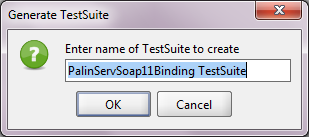
Provide a name for TestSuite.


It will ask for both SOAP 1.1 and SOAP 1.2, repeat the same steps for SOAP 1.2 also.

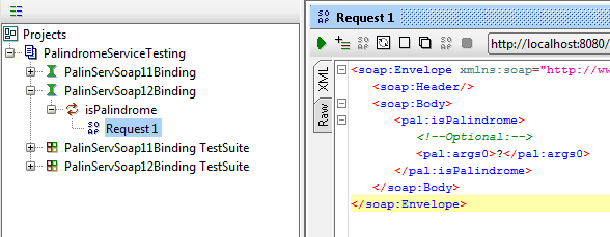
Now click on any request from either SOAP 1.1 or SOAP 1.2, you can see the request how exactly it is going to send to our service using SOAP. Shown below is the request from the SOAP 1.2 request.


Give parameters in the args0 tag in place of the "?" and click on the green play/run button in the left top corner of window Request 1. Then you can see the webservice response in the right most window of the Request 1.


Here is the output for a non-palindrome number.


Below is the output for an invalid input, you might be wondering how the SOAP UI has identified it as an "Invalid value"!


We can find the reason for the above fault code in the wsdl file where the data type is defined as int, see below the snippet from wsdl file
<xs:element minOccurs="0" name="args0" type="xs:int"/>